Showing posts with label Windows 10. Show all posts

Friday, January 13, 2017

How to Make Windows 10 Look Like Windows XP/7/Vista/8

I do not like transparent backgrounds and love the plain old windows 7 style background in windows 7.Fortunately for Windows lovers, there are many tools around to help you customize Microsoft’s Operating System to suit your own desires. The easiest way to make windows 10 look like windows XP/7/Vista/8 is to download classic shell from http://www.classicshell.net/. This application offers
  • Easily customizable start menu with multiple styles and skins
  • Quick access to recent, frequently-used or bookmarked programs
  • Find programs, settings, files and documents
  • Start button for Windows 7, Windows 8, Windows 8.1 and Windows 10
  • Toolbar and status bar for Windows Explorer
  • Caption and status bar for Internet Explorer
This has been in development for six years and is safe and still improving. As well as letting you re-design Windows and change the aesthetics of the OS, the utility enhances productivity , adds tweaks to your File Explorer and the Start menu.

Download it from http://www.classicshell.net/ and install it .After installing you will get this setting dialogue box .From here you can customize you start menu as you like.... 

For more information visit http://www.classicshell.net/faq/


Sunday, December 25, 2016

How to troubleshoot the RPC server is unavailable

Recently I got this odd error called RPC server is unavailable , none of the .exe files in my PC ran and it was very slow , also some settings were unavailable ,I found this solution in the net and thought I would share it .
If you are a Windows user, there is a high probability you have encountered an “RPC server is unavailable” error. RPC errors, which occur in situations involving communication between two or more machines through a network, are all too common in Windows. Before tackling the causes of the error and and ways to fix it, it is essential to first know about RPC in detail.

What is RPC?
RPC stands for Remote Procedure Call, which utilizes inter-processing communication technology for Windows processes within a network. RPC works on the basis of a client-server communication model, wherein client and server need not always be a different machine. RPC can also be used to set up communication between different processes on a single machine.
RPC is a kind of request-response protocol, which can be easily explained using a client/server communication model. For purposes of this tutorial, a process invoking a request will be termed as a “client” and the process responding back to the request as a “server.” Do note that here the client or the server can be different devices in a network system or can be different processes residing within a single system.
In RPC, a procedure call is initiated by a client system, which is encrypted and then sent to the server. The call is then decrypted by the server and a response is sent back to the client. RPC plays a vital role in managing devices remotely across a network and is used to share access to peripherals such as printers and scanners. On a simple note, any Windows process involving the distribution and sharing of data over a network usually uses RPC technology. Therefore, it is quite common to face an “RPC server unavailable” issue if you are a Windows user. Remote calls are, however, very intermittent when it comes to the performance and are therefore difficult to trace down.

Reasons for RPC errors
1.     File and printer sharing are disabled
This is the most common cause of RPC errors. When a procedure call or a request is made to a peripheral device such as a printer, the peripheral must be enabled for RPC and must be connected to the network with the client for it to function. If anything goes wrong here, RPC will cease to function.
2.     Network connectivity issues
Since remote procedure call relies on the network for its functioning, lack of a proper network connection might lead to server unavailability issues. In such cases, a client fails to send out a procedural call to the server resulting in the “RPC server unavailable” error.
3.     Name resolution issues
When a client initiates a request, the request is sent to the server using its name, IP address, and port address. If an RPC server’s name is mapped to a wrong IP address, it results in client contacting the wrong server and can possibly result in an RPC error.
4.     Firewalls
A third-party firewall or any other security application running on a server, or on a client, might sometimes block the traffic from reaching the server on its TCP ports, resulting in the interruption of RPCs.
5.     Registry corruption
RPC depends on a valid Windows registry to work. If any of these entries are modified incorrectly or become corrupted, the RPC service will likely stop functioning.
Dealing with RPC errors -
As mentioned earlier, firewalls or any other security-related applications running on the system can block traffic from RPC requests. If you have a third-party firewall installed, try configuring it to allow incoming and outgoing connections for RPCs and other applications that you intend to use in RPCs.

If you’re unable to configure the firewalls, try to turn off the feature for a while until your RPC is successfully made. This way, you can find out whether your firewalls are the root cause for RPC errors.

If you use the default Windows firewall, make an exception for Remote Procedure Calls and Remote desktop for RPC to function.

It can be way to complex to fix these RPC errors manually. Same for me ;) .
So I suggest using 3rd party softwares such as SpeedyPC and Reimage.

These tools can  fix all the registry entries in the system and clean all the obsolete items in the registry to improve the overall system’s performance. Tool scan be quite handy to repair your system.

Thursday, March 17, 2016

Five alternatives to Adobe Reader which are just as good if not Better


Nitro Reader 


One of the best projects out there for survey PDF documents is Nitro Reader. A free PDF viewer, this project offers all that you'd need – PDF creation, seeing PDF records and an extremely cool split-screen highlight that permits you to view two documents without a moment's delay.

A free and professional variant for $99 are accessible. In any case, the free form ought to suffice for generally clients.

The project likewise gives you a chance to move and customize any record onto the Desktop symbol for Nitro to in a split second make a PDF archive. Likewise, snap to-sign and amplified cooperation choices are accessible.

Look at it: Nitro Reader

PDFescape 

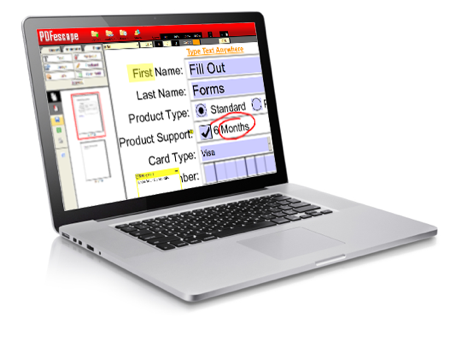
PDFescape Screenshot

For a PDF viewer that is likewise an editorial manager and structure filler, look at PDFescape. This distinct option for Adobe Acrobat Reader is free and gives you a chance to do all that you could ever need to a PDF document – make, comment on, alter, round out, secret word secure, share, spare and print it.

Moreover, there is no download required to utilize the product since it's totally cloud-based.

The one disadvantage to this product is that it just gives you a chance to transfer 10 PDF records to their servers as you utilize their administration, with none of the documents permitted to be any greater than 10MB.

After you transfer your record, you'll discover fundamental PDF choices useful for easygoing clients – explanations bolster, PDF creation and the choice to send documents specifically. In the event that you don't wish to download a committed PDF programming on your PC, PDFescape would be the ideal alternative for you.

Look at it: PDFescape

Foxit Reader 


For a speedy and lightweight adaptation of Adobe Acrobat Reader, look at Foxit Reader, another free choice in our rundown. It has some cool components, as PDF markup and remarking, propelled security and enhanced interactive media insertion.

Furthermore, this system gives you a chance to run JavaScript inside of an open PDF record.


We additionally can't overlook how this system gives you a chance to see various PDF documents utilizing multi-tab show, and additionally permitting numerous perspectives. Also, the product gives you a chance to make, team up, offer and secret word ensure your PDF document.

Look at it: Foxit Reader

PDF-XChange Viewer

For a free PDF viewer that incorporates a not insignificant rundown of cool elements, look no more distant than PDF-XChange. This PDF programming is not one to shake a stick at. Other than offering PDF survey and altering alternatives, it offers support for 256 piece AES encryption, page markup and content extraction.


One of the coolest elements of PDF-XChange however is the alternative to apply custom stamps to your record. Implanted sight and sound backing and the choice to sort specifically onto any PDF page are likewise included. It is unrealistic however to make new PDF records with this product.

Look at it: PDF-XChange Viewer

Wondershare PDF Editor 


Finally, another different option for Adobe Acrobat Reader is Wondershare PDF Editor. This capable PDF programming gives you a chance to make, see, alter and change over PDF documents. It likewise accompanies the alternative to audit and explain records, digitize OCR archives, secure PDF documents with a secret key and a helpful thumbnail review.


While the product isn't free and costs $79, it's still much less expensive than Adobe. Additionally, where Wondershare emerges in its client surveys.

Numerous adoration how brisk the product is and really lean toward it over Adobe. You can likewise highlight, erase page, trim and turn your records with this system.